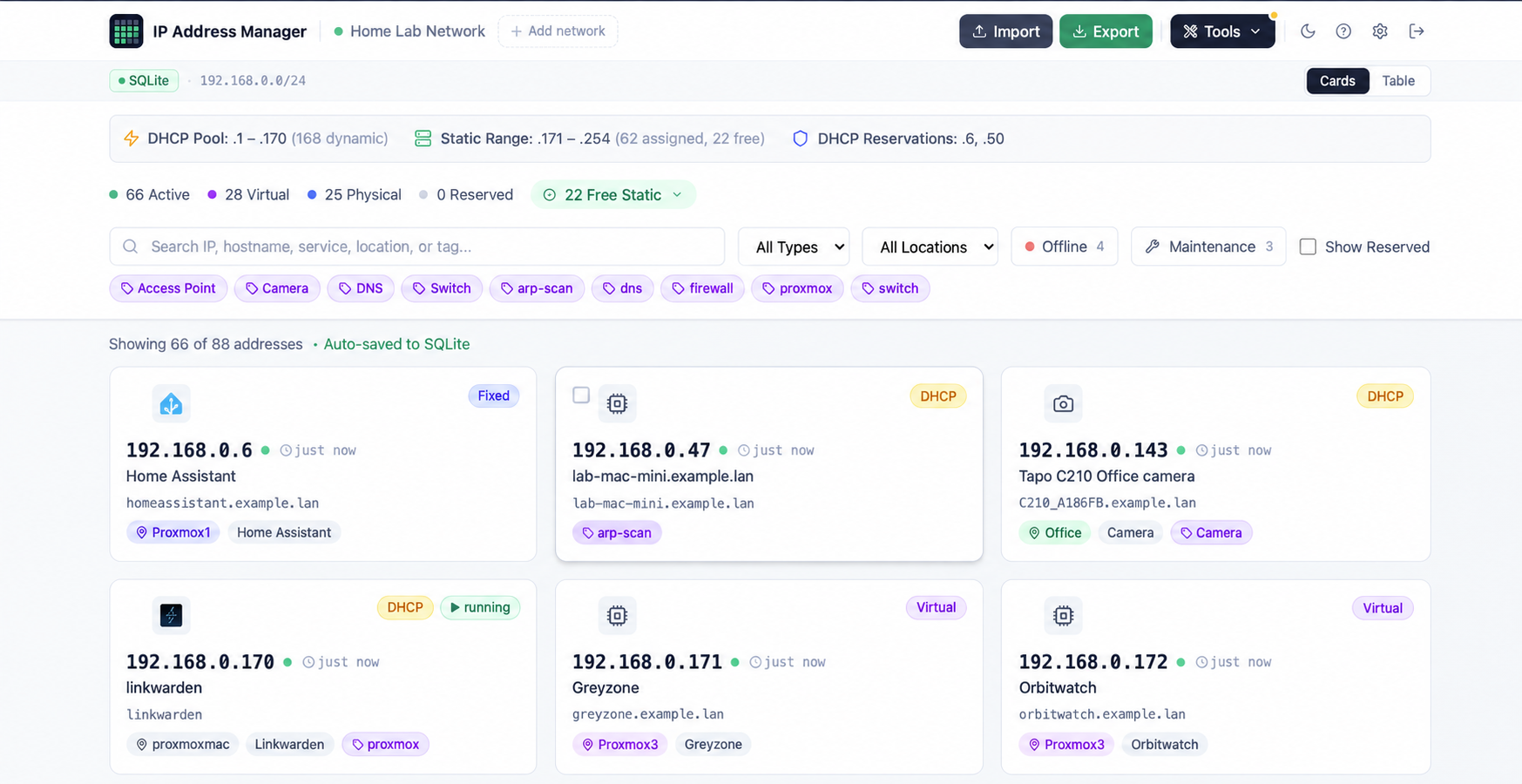
Find an address, investigate an outage, or plan a server restart. Keep your inventory, live status, device history and network relationships together.
🔧
Maintenance Mode
Mark a device Under maintenance during planned work. It leaves the offline count and stops triggering offline alerts. Clear the flag when you are ready; the Maintenance filter reminds you when a flagged device responds again.
🔎
Offline Filter
Show only devices that are not responding, with a live count and your existing type, location and tag filters. Free, reserved, unknown and maintenance entries stay out of the fault list.
🔗
Network Topology & Impact
See recorded dependencies and Proxmox guest-to-host relationships in Tools → Topology. Select a device to trace what depends on it before a restart. Optional gateway links add subnet context.
🕒
Device Status History
Expand an IP card to see when the device last responded, its outage count over the last 30 days, and a timeline of status transitions. Investigate intermittent failures without guessing.
📡
mDNS Discovery
Discover names and advertised services from compatible Apple devices, Chromecasts, printers, NAS boxes and more. Review suggestions to fill blank names without replacing your own labels. Multicast normally stays within a subnet.
👁
Network Watch
Enable an optional view of device identities seen on your network. Review unrecognised devices and add them through a pre-filled edit form. Randomised MAC addresses are excluded from the unrecognised count. Observation only: this feature does not send alerts.
🏷
Better Device Identification
See manufacturer and virtualisation-platform badges, including Proxmox, QEMU/KVM and Hyper-V, plus duplicate ARP reply indicators. Optional Pi-hole DHCP names help identify devices when Pi-hole is your DHCP server.
🔔
Notifications & Activity Log
Send device-offline, service-health, domain-expiry and backup-failure alerts to ntfy or a webhook. Consecutive-failure thresholds reduce transient ping alerts. Review the latest 500 activity events, including sign-ins and inventory changes.
🔑
API Keys & Automation
Give each script or client a named read-only or read/write key that you can revoke independently. Edit individual entries with conflict detection and discover supported capabilities. Account administration remains session-only. See the API reference for endpoint access.
🏠
Home Assistant
Bring device counts, reachability, service health and domain expiry into your Home Assistant dashboard. Generate a configuration snippet in Settings and use a dedicated API key. Maintenance status is included.
✨
Faster Loading & Update Summaries
Less to download on first load: heavier tools and dialogs load when needed. After an update, see a short summary of changes, revisit it in Settings → Updates, or switch those summaries off.
🟢
Live Ping Monitoring
The server checks tracked IPs with fping every 60 seconds. Reachability dots show which devices respond, while maintenance status distinguishes planned downtime from faults.
💙
Service Health Checks
Opt-in HTTP/HTTPS probe per entry. A sky-blue dot means the service is responding; orange means it's down. Ports are auto-suggested for 60+ common services. Self-signed TLS certs are handled gracefully.
🌐
Domain Tracker
Track registrations alongside your IP entries. RDAP lookups fetch registrar, expiry and nameserver details where the registry provides them, with colour-coded expiry badges and daily refresh. No lookup API key required.
🔍
ARP Scan & Discovery
One-click subnet sweep finds every device on your network — even the ones you forgot about. Cross-references against existing entries and pre-selects new ones for easy import.
⬡
Proxmox Integration
Import all your VMs and LXC containers directly from the Proxmox API. Scheduled background sync catches HA failovers and updates node locations automatically.
📡
DNS Reverse Lookup
Resolves PTR records for every IP against your own DNS server (Pi-hole, Unbound, or any resolver). Each network has its own configurable resolver. Flags mismatches so you can spot stale records fast.
🔗
Multiple IPs per Host
Got a server on two VLANs? Link all its IPs together. Primary cards show secondary chips; secondary cards show a back-link. Proxmox multi-NIC VMs group automatically.
🗂
Multi-Network & VLANs
Manage every subnet independently — /24s, /16s, management VLANs, IoT segments. Switch between networks instantly from the top bar.
🖼
Service Icons
Cards automatically display the real logo for 500+ self-hosted services — Home Assistant, Proxmox, Sonarr, Pi-hole, Vaultwarden, Nextcloud, and many more — via the selfh.st icon library. Assign any icon to any entry from the full searchable picker.
📤
Import & Export
Migrate from an existing spreadsheet in seconds. CSV and Excel import with merge or replace modes, intelligent column mapping, and validation. Export to formatted .xlsx at any time.
💾
Backup & Restore
Download a JSON backup of your inventory, networks, tags and change history, then restore it on another installation. Network Watch’s observation ledger is deliberately excluded from backups.
📱
QR Code Generator
Generate a QR code for any IP entry — useful for sharing WiFi credentials, service URLs, or quickly connecting a phone to a local service without typing an IP address.
🧮
CIDR & Subnet Calculators
Built-in tools for calculating subnets, broadcast addresses, host ranges, and CIDR notation — right inside the app without switching to an external tool.
🔒
Security & Two-Factor Authentication
Fresh installs generate a unique password, stored as a bcrypt hash. Login throttling and expiring sessions protect browser access. Optional two-factor authentication adds an authenticator code and ten recovery codes; API clients keep using their own keys.
⌨️
Keyboard Shortcuts
/ to search, Esc to clear/close, t/c to switch views. Mobile-friendly — toolbar collapses to a compact Tools dropdown on narrow screens.